Skip to Content
PETZ
  • 0
    My Cart
  • Home
  • Brands
  • Retailers
  • Support
    • Brand Support
    • Retailer Support
    • Support Team
  • School
  • Contact Us
    Dashboard
PETZ
  • 0
    • Home
    • Brands
    • Retailers
    • Support
      • Brand Support
      • Retailer Support
      • Support Team
    • School
    • Contact Us
    Dashboard
  1. Courses
  2. Getting Started with Lightspeed
  3. Wallet Confirmation Prompt

Nav
Home └Getting Started with Lightspeed └Wallet Confirmation Prompt

Getting Started with Lightspeed

0 %

Completed

Course content
  • Lightspeed Retail Integration
    • Enrolling with Lightspeed
  • Lightspeed X Series (Vend)
    • Enrollment
    • Customer Engagement Prompt
    • Add a Second Number to Original Account
    • Redeem Store Promotions
    • Redeem Brand Coupons
    • Completing a Sale
    • Wallet Confirmation Prompt
    • Deactivating Products
  • Lightspeed R Series
    • Enrollment
    • Configuring Lightspeed POS
      • Join this Course to access resources
    • Redeem Brand Coupons
    • Redeem Store Promotions
    • Add a Second Phone Number to an Existing Account
    • Archiving Products

Wallet Confirmation Prompt

Prev Next
Fullscreen Share


Wallet Confirmation Prompt

Confirming the customer 
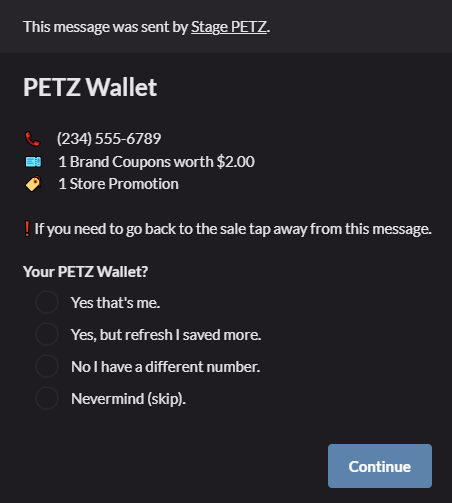
As we mentioned in the  Completing a Sale  course, after you hit pay you will be prompted with some more options. Let's explore those so that we can finish our sale!

The first option:
This is the choice if the wallet is the correct customers wallet. 

The second option:
This is used in case the customer adds a coupon to their wallet during the sale, this will refresh the wallet and the new coupon will now appear!

The third option:
This is used in the instance that a customer shares an account with a family member. The steps for pulling up the proper account are outlined in the  Add a Second Number to Original Account  course!

The fourth option:
If for some reason the customer decides to not use their PETZ coupons you select this option to remove all promotions/coupons from the sale.


  • About
  • Comments (0)
Rating
0 0

There are no comments for now.

Join this Course
to be the first to leave a comment.

  • Home
  • •  Account Portal •
  •  
  • Support
  • •
  • Privacy Policy
  • •
  • Terms of Service
petz-logo
Copyright © PETZ